I recently worked on another game jam project! This project was significant for me in a few areas. The first being that it is my second jam project outside of RVA game jams. Second, this project was my first real dive into Unreal Engine’s MetaSounds. Lastly, I had the opportunity to work with some extremely talented game developers. I will touch on most of these points in this post, but my main focus is on how I implemented audio into the game using MetaSounds.
Union Jam
The project I worked on was for the first union jam hosted by the CWA-UVW union. The CWA-UVW is a relatively new union made up of people who are fighting for better working conditions within the game industry. I saw that they were hosting a jam on Itch and decided it would be a fun and great opportunity to continue with my game audio journey!
I was team-matched into a small, but incredibly talented crew that consisted of game developers at a range of skill levels in the game industry. It ranges from “juniors” in the industry (such as myself) to pros. I want to give a quick shoutout to Miller, J. Issac Gadient, and Phi for being wonderful teammates in this jam project.
One of the most exciting things about this jam project is that our game was showcased at GDC 2026! I couldn’t attend GDC in person this year, but I want to thank my friend Momin for taking a picture of the display while they were attending the conference.

MetaSounds
I want to mainly focus on how I did the MetaSounds for this project. All of the typical things I’ve done, from music and sound design, were using the same techniques I’ve described in my previous posts on my past projects. Feel free to check that out on my site if you wish to know more about my process regarding that!
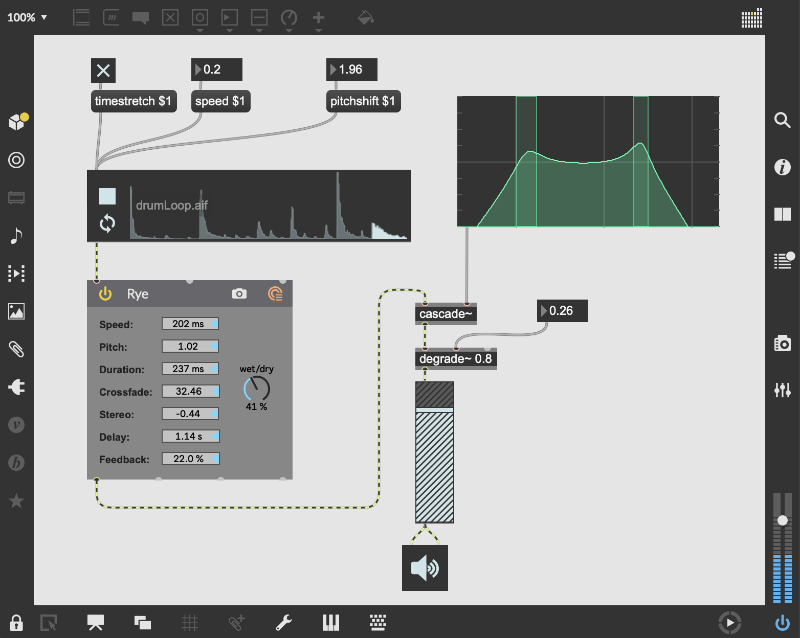
MetaSounds has a very interesting approach to audio implementation, which is unique to other game engines and even to middleware. I would say in game engines or other middleware, you implement audio in a very typical way, either by programming or by a typical DAW-like setup. What differentiates MetaSounds is that it is very object-oriented. You have blocks with specific functions that connect to other blocks. If you’re familiar with Unreal Engine’s blueprints, it’s very similar to that. For me personally, using MetaSounds brought me back to my days of messing around with MAX/MSP in college.
Here’s a screenshot from Cycling ’74’s website to show you what I mean.
Most of the sound I used in the game that used Metasounds was your standard play a sound, or play a sound from a list of sounds. I won’t go into that because it’s pretty straightforward; however, I want to talk about the background ambience. This ambience is probably my favorite I’ve implemented in any game, and what I’m most proud of.
Let me start off by showing you what this MetaSound routing looks like
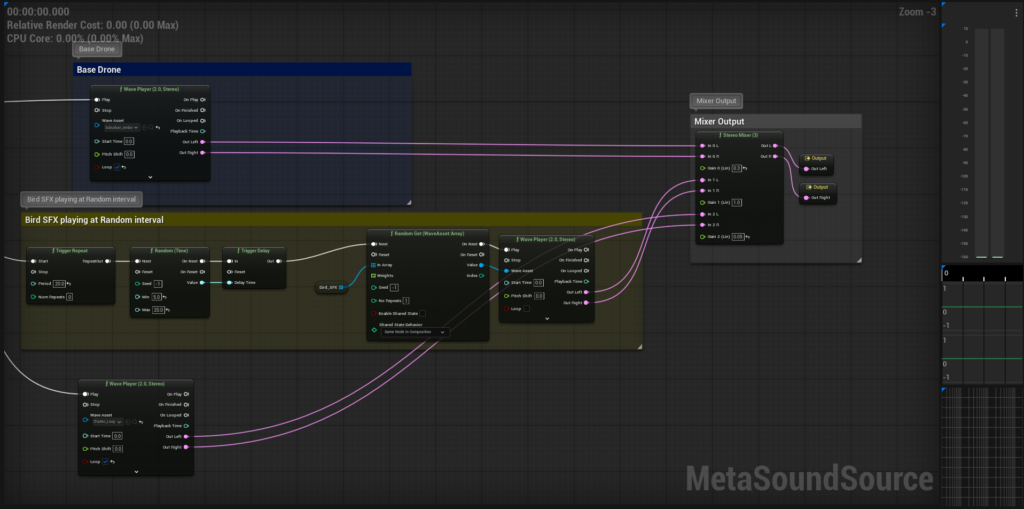
I started out by having a base drone of outdoor, suburban sounds that I recorded during my trip in Osnabrück. This just plays looped during game startup.
The second part is the bird noises. I had isolated some bird calls from some background ambience recordings I took a while ago in Eugene, Oregon. I grabbed the best few bird calls, put them in a sound array, and then had it play a random bird call sound, at a random interval, on game startup. I did this by playing a trigger on game startup that would repeat every 20 seconds. This trigger would go into a random time function that would generate a random time between 5 and 20 seconds. This was then fed into a triggered delay. When the triggered delay fires off, it would get a random bird call noise from an array and play it. This is all contained in the yellow block in the screenshot.
Lastly, as the project advanced, there was a need for crowd noises. I grabbed one of my crowd noise recordings I made, looped it, and played it at game start time.
This background ambience is deceptively simple, yet complex. For my past projects, whenever I introduced randomness into the ambience, I would have to bake it into the waveform randomly and hope it doesn’t sound like it’s repeating when playing for long sessions. With this MetaSound implementation I made, it is truly random and dynamic! Every time a player plays the game, they will hear a different ambience. I really don’t have much control over what they hear! This is why it’s my favorite implementation of background ambience, and I hope to continue using similar methods when I go back to other tools such as FMOD.
Conclusion
I could go on about audio stuff in this project, but as previously stated, they’ve all been using generally the same techniques I’ve talked about in my past projects.
This project, however, has been very fulfilling in many ways. I was able to use MetaSounds for the first time, and I was able to connect with game industry professionals at the same time!
Thank you Miller, Phi, and J Issac Gaident for being incredible team mates. I would love to work with you again an any future projects!
I am open to any collaborations! Feel free to connect with me by reaching out to me on my various social media, or by sending me an email via the contact form!
You can play our game here!
Leave a Reply